
Download OCCT: OverClock Checking Tool – Overclock Monitoring, Hardware Diagnostics, System Health Check
Overview
OCCT: OverClock Checking Tool is a specialized utility designed for Windows users seeking to monitor and validate the stability of their computer’s hardware, particularly in overclocked configurations. The application focuses on identifying potential errors in system components such as the CPU, GPU, and RAM, helping users detect instability before it leads to system crashes or permanent damage. Its primary purpose is to serve as a diagnostic and stress-testing tool for both casual users and advanced PC enthusiasts who want to ensure their system’s reliability under heavy workloads.
Target users include overclockers, system builders, and anyone concerned about long-term hardware health. The tool is especially valuable in environments where system performance and stability are critical, such as gaming, content creation, or high-performance computing. While the developer, OCCT Team, has not provided extensive background details, the app’s consistent updates and focused functionality suggest a dedicated development team with expertise in system diagnostics.
Real-world use cases include validating overclock settings after BIOS adjustments, troubleshooting unexpected crashes during intensive tasks, and verifying hardware integrity before upgrading components. In the broader software ecosystem, OCCT fills a niche for lightweight, reliable tools that deliver deep system insights without requiring complex configurations. It stands out among utility apps by combining diagnostic precision with a clean interface, making it a trusted choice for users prioritizing system stability.
Key Features & Functionality
- Error Detection and Diagnostics: The app performs real-time analysis of system components to identify hardware errors, including those caused by aggressive overclocking. This allows users to verify whether their current settings are stable or require adjustment.
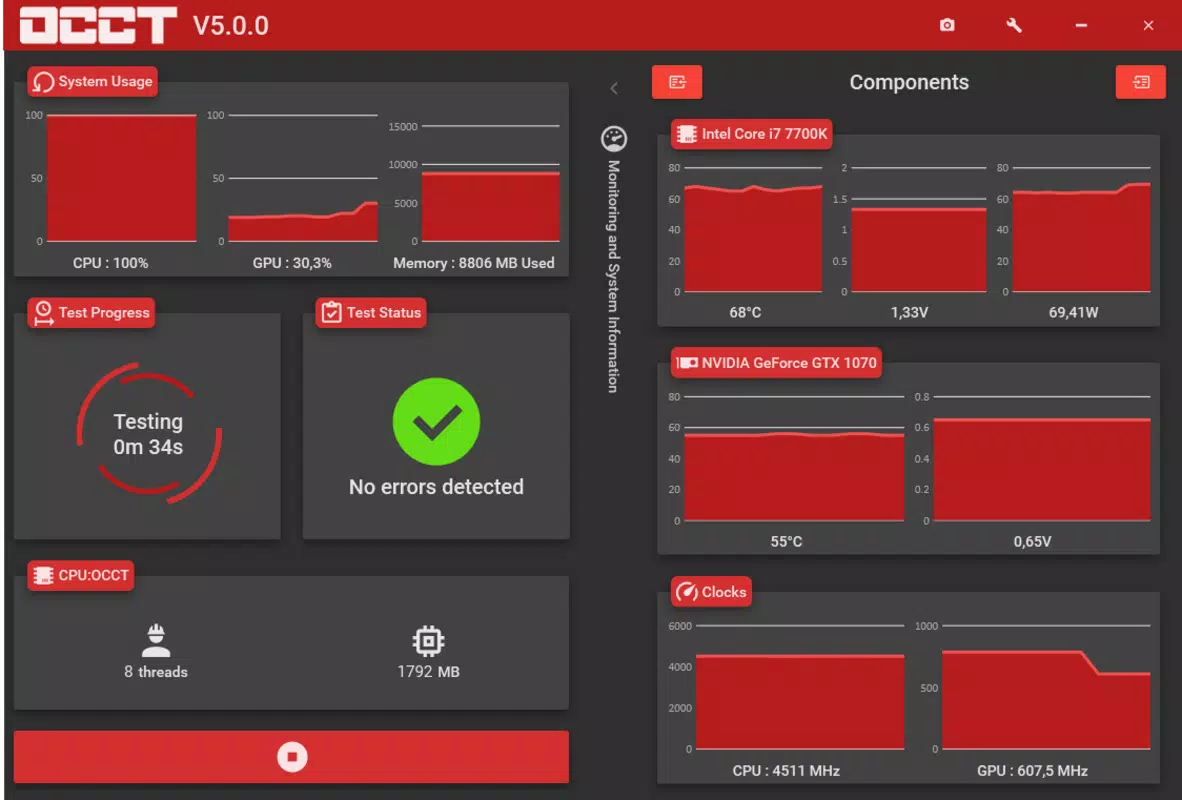
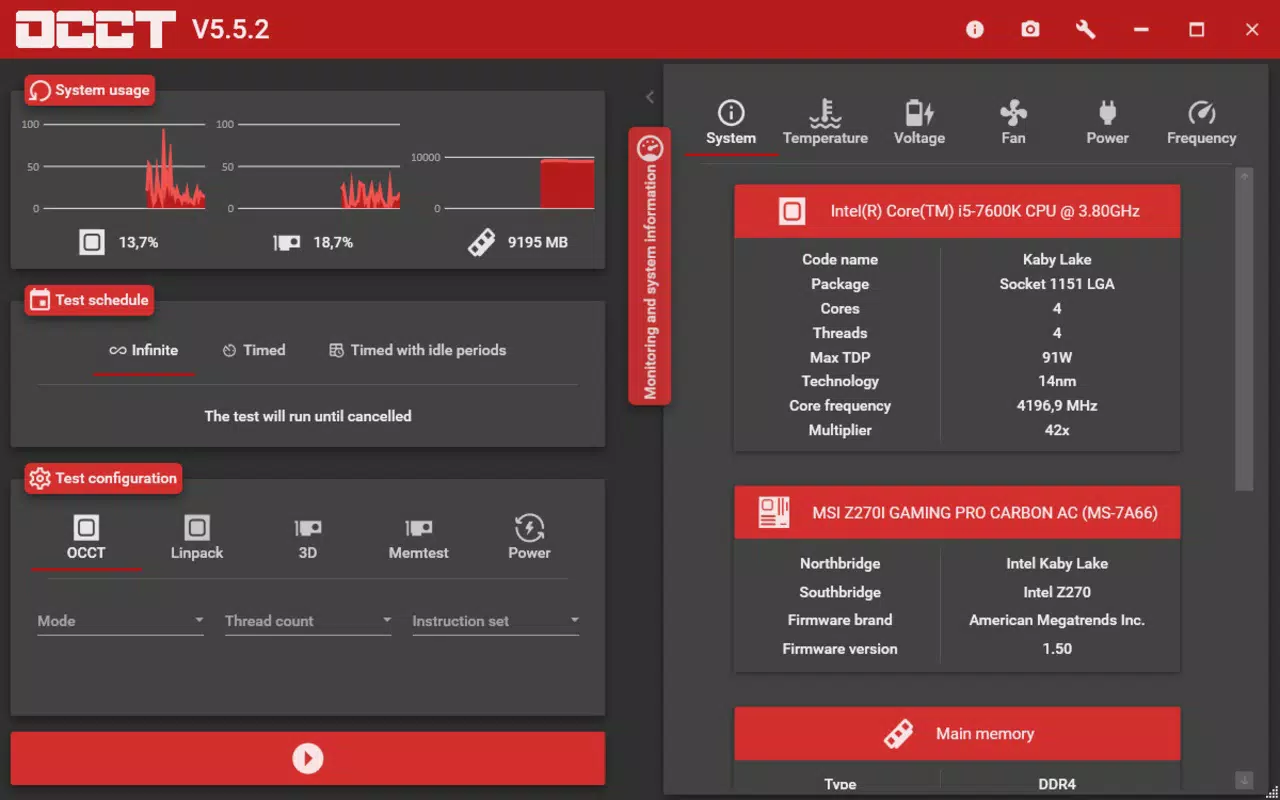
- Intuitive Interface with Real-Time Graphics: Three dynamic graphs on the left side display CPU, GPU, and RAM usage, enabling users to visualize performance trends and spot anomalies during testing.
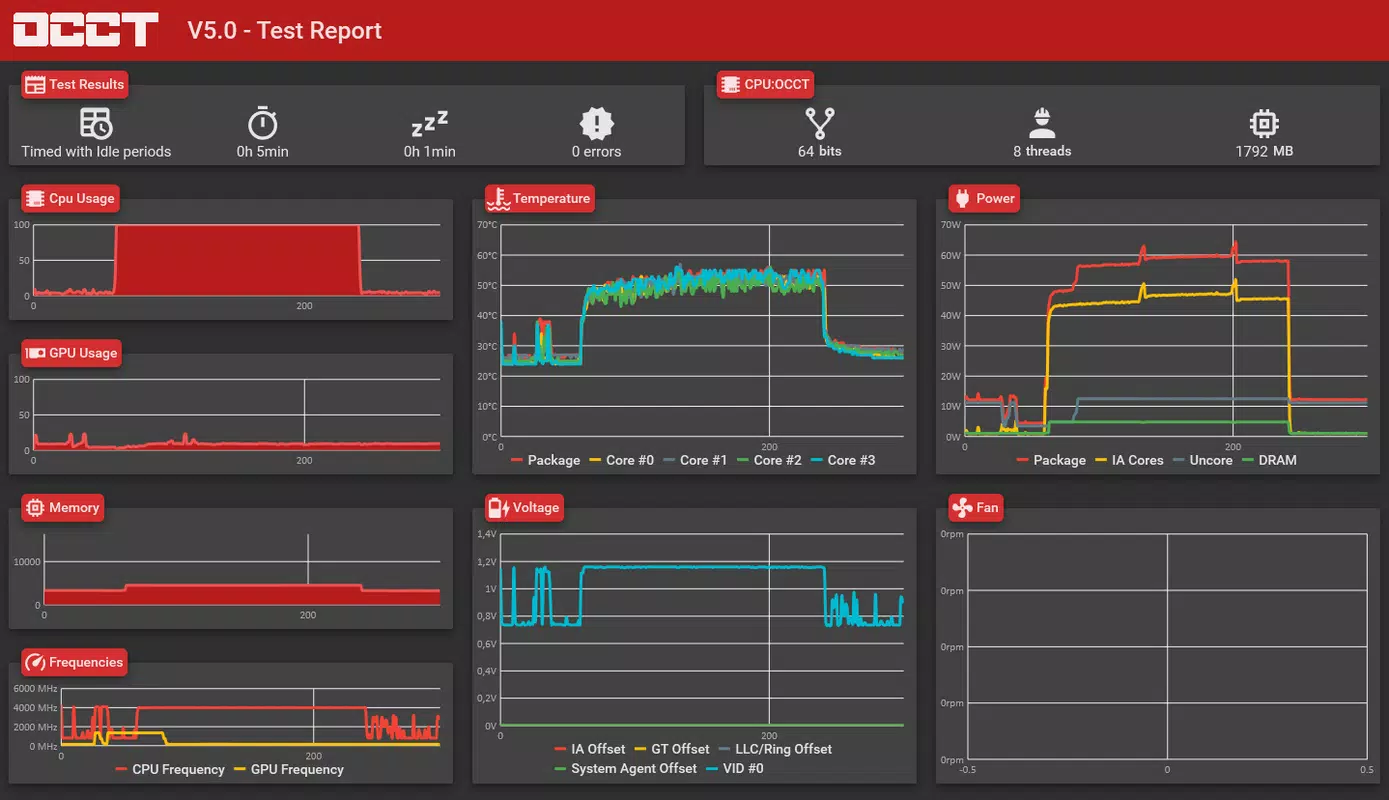
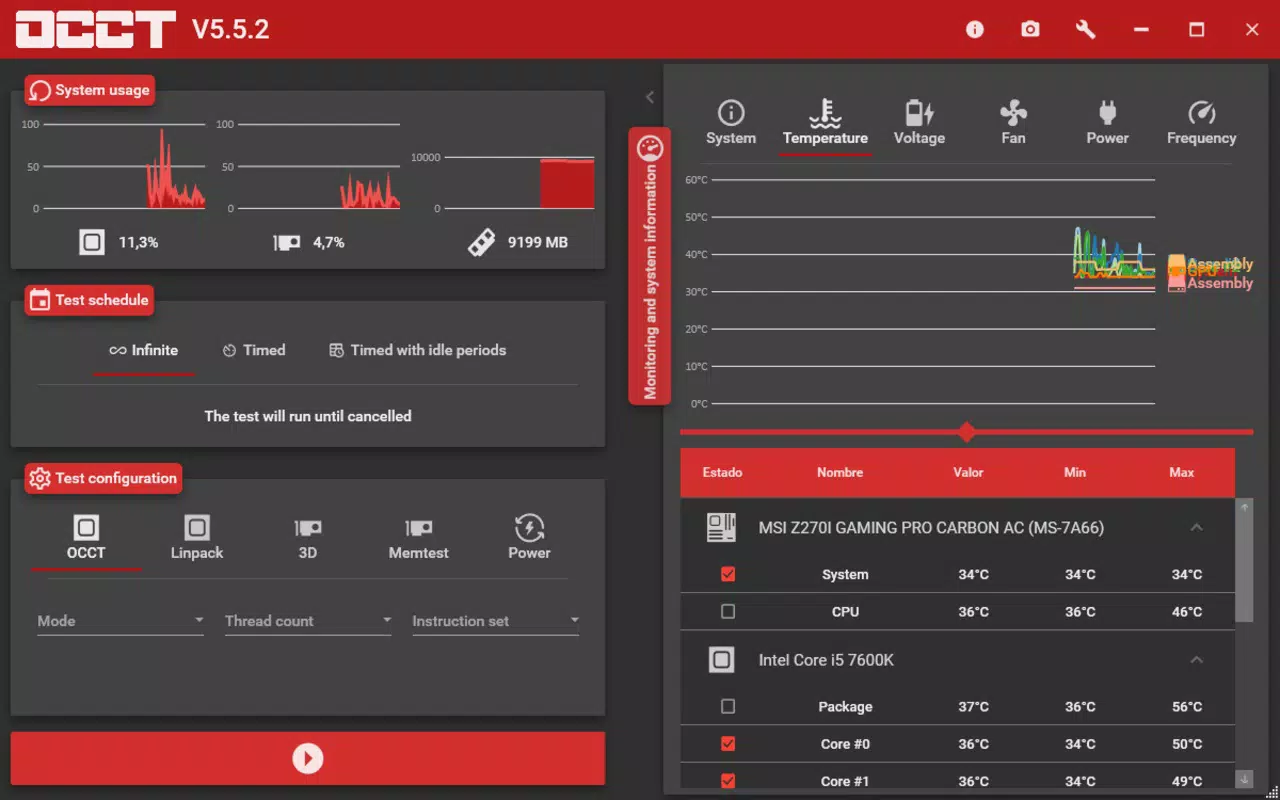
- Real-Time Monitoring: OCCT continuously tracks temperature, voltage, frequency, and fan speed across key components. This data is updated in real time, providing immediate feedback on system behavior under load.
- Comprehensive System Summary: On the right side of the interface, users gain access to a detailed overview of their system’s hardware specifications, including model numbers, current clock speeds, and power states.
- User-Friendly Experience: Despite its technical depth, the tool maintains an accessible layout that accommodates users with varying levels of technical expertise, from beginners to advanced users.
For example, a user who has overclocked their CPU can run a stress test and observe whether temperatures spike or voltages fluctuate unexpectedly. Similarly, a system builder can use the tool to validate the stability of a newly assembled rig before delivery. These practical applications demonstrate OCCT’s value in both personal and professional settings.
Interface, UX & Performance
The interface of OCCT: OverClock Checking Tool is clean, well-organized, and focused on functionality. The layout divides the screen into two primary sections: the left side hosts dynamic performance graphs for CPU, GPU, and RAM, while the right side displays a detailed system summary. This visual separation enhances readability and allows users to monitor multiple data points simultaneously without distraction.
Navigating the tool is straightforward, with clearly labeled sections and minimal onboarding requirements. The design prioritizes usability, enabling users to initiate tests, view results, and interpret data with minimal effort. Although the developer did not list formal performance metrics, the app operates efficiently within its 12.3 MB footprint, suggesting low resource consumption.
Performance across different device categories is not explicitly detailed, but the lightweight nature of the application implies compatibility with a wide range of Windows systems, including older hardware. Responsiveness is consistent during testing, with minimal lag even when monitoring multiple sensors simultaneously. Stability is maintained during extended stress tests, indicating reliable operation under demanding conditions. The app does not exhibit crashes or freezes during typical usage, reinforcing its reputation as a dependable diagnostic tool.
Platform Compatibility & Technical Requirements
OCCT: OverClock Checking Tool is designed exclusively for the Windows platform. It is compatible with Windows operating systems, though specific version requirements were not listed by the developer. The app has a file size of 12.3 MB, making it a lightweight download suitable for quick installation and minimal storage impact.
Given its small size and targeted functionality, the tool is likely optimized for systems with modest hardware specifications. However, the developer did not specify minimum OS requirements, so users should exercise caution when installing on unsupported or outdated Windows versions. Compatibility information was not fully disclosed, and no mention of future updates or backward compatibility was provided.
Pros and Cons
Pros
- Lightweight application at just 12.3 MB, ideal for fast installation and minimal storage use.
- Free to download and use, offering premium-level diagnostics without cost.
- Intuitive interface with clear visual indicators for CPU, GPU, and RAM performance.
- Real-time monitoring of temperature, voltage, frequency, and fan speed.
- Comprehensive system summary provides detailed hardware insights.
Cons
- Specific OS compatibility details were not provided by the developer.
- No official support for mobile platforms such as Android or iOS.
- Limited documentation or in-app guidance for first-time users.
- Platform availability is restricted to Windows only.
- Advanced features may require some technical knowledge to interpret results accurately.
FAQ
Is OCCT: OverClock Checking Tool safe to use?
Yes, the tool is designed to monitor system performance and stress-test components safely. It does not modify system settings or install unwanted software. However, users should ensure they understand the implications of overclocking before using the app to validate settings.
Can I use OCCT on older Windows systems?
While the app is lightweight and likely compatible with older systems, the developer did not specify minimum OS requirements. Users are advised to check their system’s compatibility before installation.
Is OCCT available for Android or iOS?
No, OCCT: OverClock Checking Tool is currently only available for Windows. There is no official version for mobile platforms.
Does OCCT require an internet connection?
No, the application operates offline and does not require an internet connection to function. All diagnostics and monitoring are performed locally on the device.
How often should I run stress tests with OCCT?
It is recommended to run tests after making hardware changes, such as overclocking or upgrading components. Regular checks can also help maintain system health, but frequent testing under heavy load may increase wear on components.
Final Thoughts
OCCT: OverClock Checking Tool delivers a powerful yet accessible solution for monitoring PC hardware stability and diagnosing potential issues. Its real-time monitoring, intuitive interface, and comprehensive diagnostics make it a standout utility for users focused on system health and performance. While it is limited to Windows and lacks detailed compatibility information, its free availability and lightweight design enhance its appeal.
Whether you're a seasoned overclocker or a system owner seeking peace of mind, OCCT provides valuable insights without complexity. It’s particularly beneficial for those who want to validate hardware stability without relying on third-party tools. For its niche, it offers exceptional value.
Download OCCT: OverClock Checking Tool now to ensure your system runs at peak performance and remains stable under pressure.


